
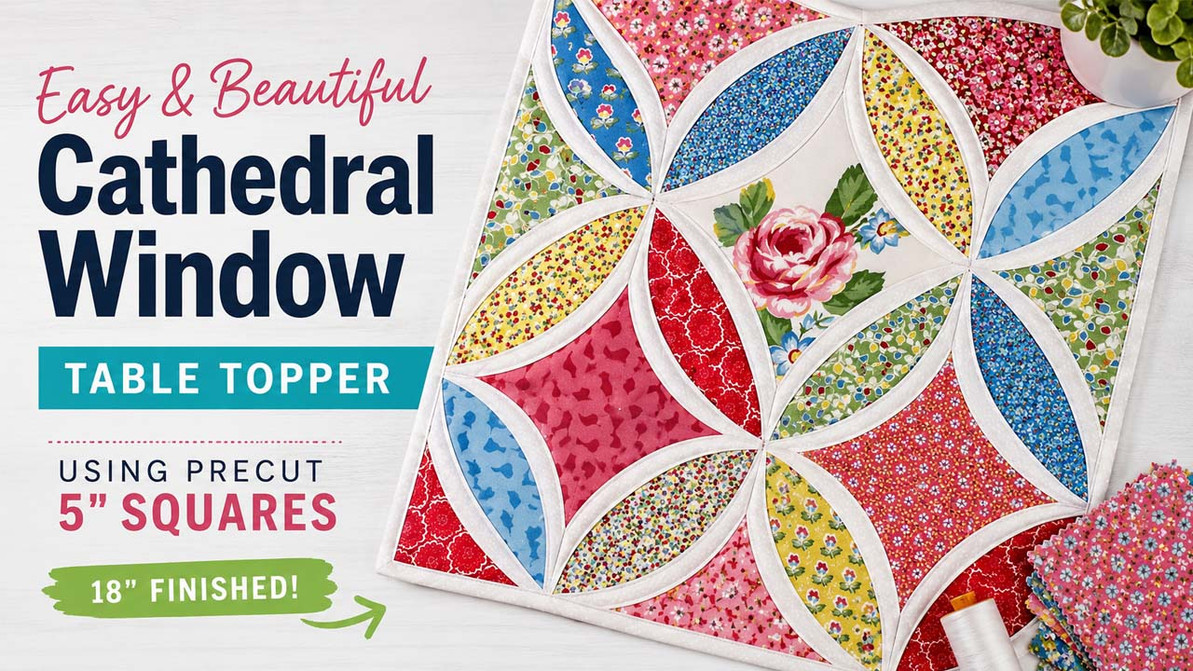
Stitch a Stunning Cathedral Window Quilt
5" Square Quilt Tutorial
Make a Cathedral Window Table Topper with 5" Fabric Squares
Key Takeaways: This cathedral window table topper looks detailed and impressive, but it is made with a simple folded-fabric technique and precut 5" squares. The finished project measures 18" square and creates beautiful curved window shapes without complicated cutting.
Ready for a quilting finish that looks incredibly complex but is actually easy to make? Cathedral windows are for you.
This technique uses folded triangles to create beautiful, intricate curves, and it is all done using precut 5" squares. That is right. This entire quilt top requires only 3 cuts.
Check out the YouTube video for this project here.

This table topper measures 18" square.
Jump to a Section
What You Need
To get started, choose a pack of precut 5" print squares and a pack of precut 5" white squares for the accent. In the original project, Cottage Blooms was used for the print squares.
| Supply | Details |
|---|---|
| 5" Print Squares | Choose colorful focal prints for the cathedral window centers. |
| 5" White Squares | These become the folded accent triangles that create the curved window effect. |
| Batting and Backing | Used to layer the quilt top before stitching down the folded edges. |
| Binding Yardage | Cut 2 binding strips at 2-1/4" x WOF to finish the topper. |
| Thread | Use thread that blends with the folded white fabric for clean curved stitching. |
Project supplies: Cottage Blooms 5" Squares, Mixed White 5" Squares, and all 5" square precut options.

Start with 5" Squares
Choose a favorite print pack and white accent squares, then follow the folded-fabric steps below.
Preparing the Folded Triangles
Step 1: Lay Out the Focal Print Squares
Select 16 focal print squares and lay them out in 4 rows of 4 in your desired order. Take a picture before you move anything so you can refer back to the layout later.

Step 2: Fold the White Squares
Fold one 5" white square in half diagonally, wrong sides together, and press. Repeat until you have made 32 folded triangles.

Step 3: Place Folded Triangles on the Print Squares
Align 2 folded triangles on a focal print square from Step 1, matching the raw edges. Pin to secure, especially at the points.

Step 4: Baste the Outer Edges
Using a basting stitch, sew around the outer edge of the square with a 1/8" seam allowance. This holds the triangles in place during assembly. Make 16 total units.

Making the Topper
Step 5: Sew the Units Together
Referring to your photo, lay out the squares in the original order and note the direction of the folded edges. Those folded edges should create 5 diamond shapes as shown below. Sew the units into rows, then join the rows. Press seams open to reduce bulk.

Step 6: Cut the Print Triangles
Select 3 print squares. Cut 1 square diagonally in half twice to create corner triangles. Cut 2 squares diagonally in half once to create side triangles.

Tip: Before placing the next prints, check which fabrics are hidden underneath the folded white triangles. This helps you spread color and print placement evenly across the topper.
Step 7: Place the Print Squares and Triangles
Lay out 5 print squares, plus the triangles from Step 6, on the background from Step 5. Center the squares and triangles within the white areas, aligning the points on the white seam lines.

Step 8: Fold and Pin the Curved Edges
Fold the white edges over the print squares and triangles and begin pinning. These folded edges will naturally create a curved effect. The corners should overlap into points. Make sure the edges of your placed print squares are covered by the white curved folds.

Here is a close-up of the pinning in progress.

Ready to Make the Curves?
The folded fabric does the hard work for you. Pick your prints, prep your white squares, and watch the window shapes come together.
Finishing the Table Topper
Step 9: Layer and Stitch
Layer the quilt top with batting and backing, then baste the layers together. Using matching thread, carefully stitch the folded white areas down, sewing along the edge that overlaps the squares and triangles added in Step 7.
Sew all of the curved edges in each horizontal row. Work slowly and carefully, pivoting the foot with the needle down at each intersection.

Step 10: Trim and Bind
After stitching, trim the batting and backing even with the quilt top. Cut 2 binding strips at 2-1/4" x WOF from yardage and bind the quilt.
That is it. Magic curves made through folded fabric.


Make One for Your Table
This 18" square topper is a beautiful way to turn 5" squares into a polished project with soft curves and lots of color.
Cathedral Window Table Topper FAQ
How big is the finished cathedral window table topper?
The finished table topper measures 18" square.
Can I make this project with precut 5" squares?
Yes. This project is designed around precut 5" squares, including print squares for the focal fabrics and white squares for the folded accent pieces.
How many folded white triangles do I need?
You will make 32 folded white triangles by folding 5" white squares in half diagonally, wrong sides together, and pressing.
Why should I take a photo of my layout?
A quick photo helps you keep the original print placement in order when you begin sewing the units together.
Where can I find 5" precut squares for this project?
You can browse available 5" square precuts here: Shop 5" Squares.
Recent Posts
-
Machine Embroidery Needles: Sizes, Types & How to Choose
Machine Embroidery Needle Guide Machine Embroidery Needles Explained: Sizes, Points & How to Cho …Sep 10th 2026 -
Scrappy Pumpkin Patch Wall Quilt Tutorial with 5" Squares
Free Fall Quilt Tutorial Scrappy Pumpkin Patch Wall Quilt Tutorial with 5" Squares Key Takeaways: …Sep 2nd 2026 -
12 Spooky-Cute Designs & Projects to Stitch
Halloween Embroidery Inspiration 12 Halloween Embroidery Ideas for Spooky-Cute Projects Key Takea …Aug 10th 2026